Why your defaults decide the first ten seconds of a match
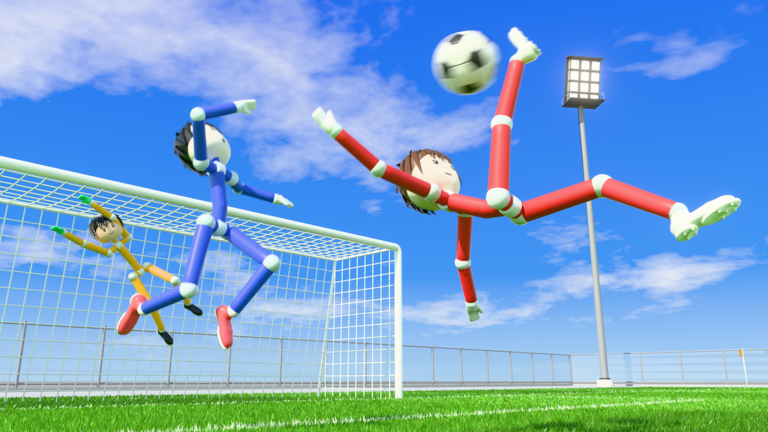
Ragdoll Soccer is a physics heavy soccer experience on Roblox where ragdolling, curving shots, and quick lobs decide who reaches the ball first. The supplied beginner guides all point at the same reality: players who queue straight into a match without touching their controls spend the opening minutes fighting their own layout instead of the opposing goalkeeper. Before you queue, there is real value in a short pre-run checklist that fixes how you aim, how you curve, and which server you drop into. This guide walks that checklist in the order veterans work through it, using only what the beginner guides, video walkthroughs, and the in-game practice station actually document.
Because this is a timing game, the reaction time you save by knowing your keys is the difference between a slide tackle that wins the ball and one that leaves you on the ground. The sections below cover visual and aim setup, server selection, control layout, and notes for players outside the default PC setup.
Visual setup: aim cursor, camera height, and shot direction
Shooting in Ragdoll Soccer is not a fixed animation. You hold the shoot control, build power, and aim the direction of the ball with the cursor, and the practice station lesson states plainly that shots go where you look. That makes camera height a performance setting rather than a preference:
- Look down to keep a shot low along the turf, which is useful when a goalkeeper is standing tall.
- Look up to lift the ball, which pairs with a lob over the defensive line to a teammate.
- Hold the aim cursor where you intend the ball to travel before releasing, since power builds while you hold and the direction is read from your aim at release.
Power itself is a tradeoff the guides call out repeatedly. A higher power shot is generally harder for the opposing goalkeeper to save, but stronger shots are also harder to control, so experimenting with power levels in the practice station beats discovering the ceiling in a live match. The power shots lesson exists for exactly this reason, alongside shooting basics and the moving and sprinting lesson.
Server choice before you queue: quick play, online, and pro servers
Server selection is the second pre-run decision. The game offers a quick play option, an online option, and pro servers that add referees, penalties, out of bounds calls, and live stadiums, alongside the standard modes including 4v4 quickplay and chaotic 8v8 matches with referees and throw-ins. Each of those environments punishes a different mistake:
- Quick play is where the guides suggest sharpening shooting, passing, and tackling against real players after you are comfortable with the controls.
- Pro servers introduce refereeing and out of bounds rules, so a wild power shot that leaves the pitch is no longer a harmless turnover.
- 8v8 with referees and throw ins means more bodies in the lane, which rewards lobs and curved passes over dribbling straight into a slide tackle.
Pick the queue that matches what you are working on, and keep in mind that club position moves with results. Consistent wins push your club up the rankings while repeated losses drop it, so queuing with teammates you can communicate with is a legitimate ranking decision, not just a comfort one.
Control layout: the defaults worth relearning before you queue
The documented PC defaults are worth memorizing cold, because every advanced trick in the game is built on top of them:
- Movement: WASD or the arrow keys, Jump: Space, Sprint: Shift, Shift Lock: Ctrl.
- Kick or Lob: left mouse button after selecting the shot type, with Cancel Kick on R when you commit early.
- Curve: Q to bend a shot left and E to bend it right, which is how you take a shot around a positioned goalkeeper.
- Slide Tackle: X, Poke: Q, Call for ball: G.
- Skill moves: Z cuts back, X pushes the ball ahead, and C takes it the other way, used to get past the opponent's defense once you receive the ball.
Two habits separate clean play from clumsy play here. First, slide tackling is slow, so spamming it leaves you grounded while the ball rolls past. Second, the lobs are the passing engine: controlling a lob's direction to a teammate consistently creates the better scoring chance, and one guide flatly credits lobbing as the reason a goal happens. Build your pre-queue warmup around a curve, a cancel, a lob, and one skill move rather than a raw shot.
Low-end devices and non-PC layouts
The control tables in the research are explicitly labeled as default PC controls, and the video walkthroughs show an in-game screen that displays all the controls, so the first device task is to open that display and confirm your bindings rather than assuming they match a guide. Use the practice station to test your layout before any ranked-style queue: the moving and sprinting lesson checks whether your movement keys feel right, the shooting basics lesson confirms left mouse shooting and cursor aim, and the power shots lesson confirms that charging and sprinting into the ball still work on your hardware. If a lesson feels awkward there, it will feel worse in an 8v8 with referees.
FAQ
Q: Which control should I use to curve a shot in Ragdoll Soccer?
Press Q to curve the ball left or E to curve it right while shooting, and press R if you want to cancel a kick you have not committed to yet.
Q: What is the difference between quick play and pro servers?
Pro servers add referees, penalties, out of bounds calls, and live stadiums, while quick play and the standard 4v4 and 8v8 modes carry fewer of those match rules. The guides recommend using quick play to improve shooting, passing, and tackling against real players.
Q: Are there any codes to enter for Ragdoll Soccer right now?
There are currently none to redeem. This page is monitored and updates the moment codes drop.
Run the checklist, then queue
Set your aim habits first, because shots go where you look and the cursor decides direction. Then choose the queue that fits your goal, whether that is quick play for reps or pro servers under referees. Finish by memorizing curve, cancel, lob, and the Z, X, C skill moves so your hands are ahead of the play, and confirm everything in the practice station lessons before you commit to a match. Do that and your first ten seconds belong to you instead of to your own settings.
Ragdoll Soccer Codes (November 2026)
No active codes yet for Ragdoll Soccer; 2 unverified codes are being tracked.
Not yet fully verified. This list updates as sources are rechecked.
No verified active codes are currently recorded for this game. 2 community reported codes are awaiting verification in the Unverified Reports list below, with the source and date we recorded where available.