
Why your default setup costs you before the run starts
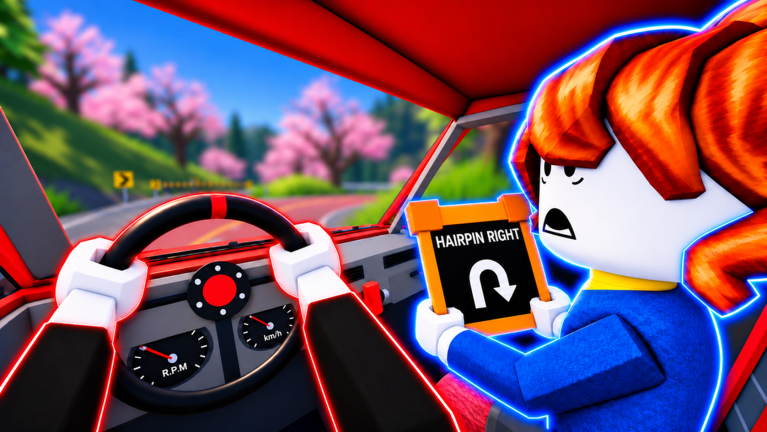
Rally Panic! is a first-person, two-player co-op rally game where one player drives and the other navigates. The driver handles steering and the handbrake, while the navigator follows the map and calls out turns, hazards, and which road to take. That split of attention is the whole game: dense forests, narrow bridges over deep ravines, and roads where one bad call sends the team the wrong way.
Because both roles depend on split-second reads, anything that steals frames or delays a call lands directly in your lap. A stutter right as the navigator shouts a turn, or a hitch while you reach for the handbrake on a ravine crossing, is the difference between the finish and the wrong road. The checklist below is what to settle before you queue, not during the run.
Graphics settings ranked by visual cost
Work down this list and stop at the point where the roads and hazards stay readable. Lower visual cost settings free up headroom for the first-person view, which is what you actually stare at.
- Detail and effects first. Pull back decorative detail and particle effects. Forest clutter and environmental flourishes are the cheapest things to give up, and they are not what you need to read a ravine edge or a bridge gap.
- Lighting and shadows next. Softer or reduced lighting loses atmosphere but keeps road lines and turn markers legible. Shadows are pure visual cost in a game where your real target is the road ahead.
- Draw distance last before you touch readability. Shortening how far the world renders smooths things out, but the navigator still needs to see far enough to call the next road. If the map call suffers, restore this before anything else.
- Keep your view intact. First-person is the game's framing, so do not crop or obstruct the center of the screen with overlays. The driver needs the steering response in front of them and the navigator needs an uncluttered read of the map.
No performance figures are quoted here because none are documented for Rally Panic!. Judge each change by whether the road, the bridge, and the next turn stay readable.
Network basics: settle this before the duo loads in
Latency hits this game twice. The driver feels it on steering and handbrake timing, and the navigator feels it when a call arrives a beat late. Both symptoms look the same in a rally: a turn taken too early, a handbrake applied after the bridge entry, or a call that arrives after the fork.
- Choose a stable server region before you queue. Pick the server closest to both you and your partner, since the run only works if the driver and the navigator are both responsive.
- Watch for the lag signatures. Repeated late calls, steering that catches up after you release it, and hazards registering late are all signs to leave and find a cleaner server rather than push the run.
- Back off your connection while queued. Downloads and streams compete with the call quality your navigator depends on.
UI and control layout the duo should agree on
Rally Panic! rewards a clean, agreed layout more than a clever one. The driver's steering and handbrake must be reachable without looking away from the first-person view, and the navigator's map read must never sit behind a menu.
- Fix your controls before the run, not during it. A handbrake that sits under a different finger than you expect will cost you on every narrow bridge.
- Agree on call phrasing. Short, consistent calls for turns, hazards, and road choices beat long sentences when the forest closes in.
- Claim your free Coins before the run. Free Coins give a useful head start, and putting them toward upgrades that help you progress is a better use than cosmetics when you are still learning roads.
Device notes for phones, tablets, and low-end laptops
On weaker hardware, the first-person forest views and ravine crossings are the heavy moments. Drop detail and effects before you touch anything that affects how clearly you see the road, and keep the screen clear of clutter so the driver's hands and the navigator's map both stay readable. If a device can hold a steady view through a dense forest stretch, it is ready to queue.
FAQ
Q: What are the two roles in Rally Panic!?
One player drives, controlling steering and the handbrake, while the second player navigates by reading the map and calling out turns, hazards, and which road to take.
Q: What makes Rally Panic! runs fall apart?
Poor calls and late reactions. The game sends duos through dense forests and across narrow bridges over deep ravines, where one bad call can send the whole team the wrong way.
Q: Are there codes to enter in Rally Panic!?
No rewards can be claimed yet for Rally Panic!. When new codes are released, they will appear in the live list on this page, which is monitored and updates the moment codes drop.
Settle the checklist, then queue
Rally Panic! is built around teamwork, quick calls, and split-second decisions that can send a rally straight into a ravine. Sort your graphics, your server, your control layout, and your call phrasing before you and your partner load in, and save your attention for the only things that matter mid-run: the steering wheel, the map, and the next road.
Rally Panic! Codes (November 2026)
No active codes yet for Rally Panic!; 1 unverified code is being tracked.
Not yet fully verified. This list updates as sources are rechecked.
No verified active codes are currently recorded for this game. 1 community reported code is awaiting verification in the Unverified Reports list below, with the source and date we recorded where available.