Why your settings decide the run before the cart moves
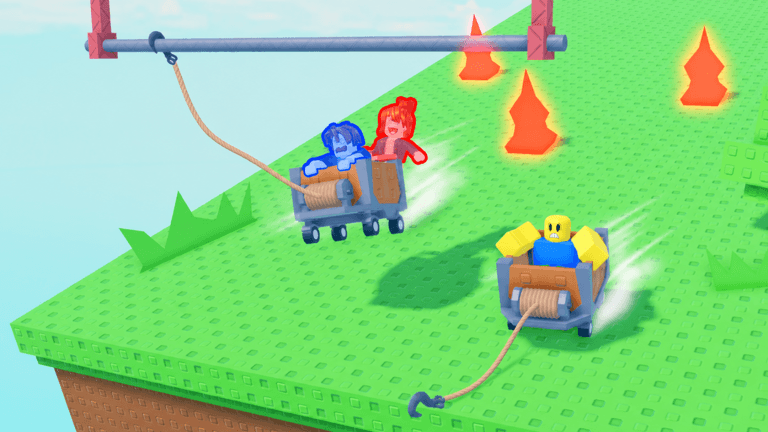
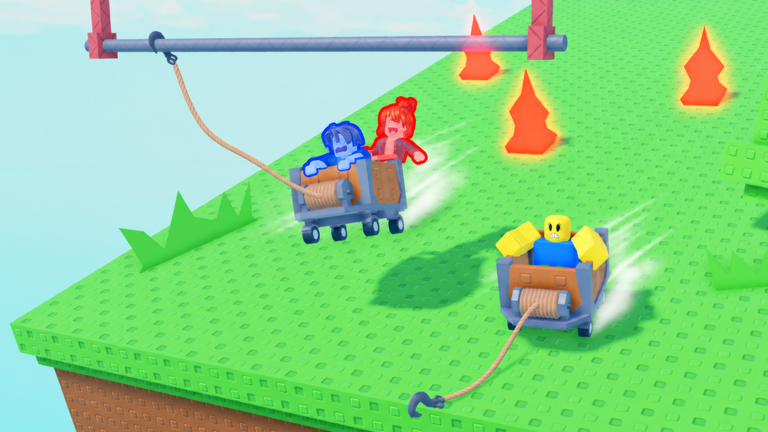
Grapple Cart Obby is a precision-focused Roblox obstacle course built around two tools: the cart you ride and the grappling hook that pulls you toward a target. Your objective on every stage is to combine both so you reach the end safely, which means steering with W, A, S, D, firing the hook with E, and dragging on the brakes with the spacebar at exactly the right moment. When your frame rate stutters or an input lands late, the stage list stops being a progress tracker and starts being a list of resets. This is a game where a delayed brake press on a narrow bridge is the difference between a clean crossing and a fall, so the work you do in the menus before you queue matters as much as your reflexes on the track.
Graphics settings ranked by visual cost
Work down this list from the heaviest visual layer to the lightest. Each change trades atmosphere for readability, and on a course where you are tracking rails, ledges, and drop-offs, readability usually wins.
- Overall graphics quality: the single largest lever. Dropping it flattens lighting and post effects, which makes track edges and gaps easier to read while the cart is moving fast.
- Shadows: turning shadows down removes the soft dark patches that can hide the seam between a rail and a ledge, and it is one of the first things to cut if your frames dip mid stage.
- Materials and textures: simpler surfaces make the course geometry read as plain shapes, which helps when you are keeping a crosshair on one of the tracks to hold a line.
- Distance and effects: trimming decorative effects keeps distant scenery from pulling attention away from the section directly in front of your cart.
This guide does not quote performance numbers, because no tested figures exist in the sources behind it. The rule to apply is simple: if a setting changes how the course looks without changing how it plays, it is a candidate to turn down before you queue.
Network basics: what lag looks like on a cart
Latency problems in Grapple Cart Obby do not announce themselves. They show up as habits you have to correct for, and naming them early keeps you from blaming your own timing.
- The hook feels late. You press E, and the pull arrives a beat after you expected it, so you overshoot the gap you were aiming for.
- The brake does not bite. You hold spacebar and the cart keeps rolling, which is punishing on the sections where speed has to be controlled carefully or you fall off.
- Other carts stutter. In lobbies with multiple players, jerky movement from everyone else makes Free Pushes and shared space harder to read.
If you notice these, pick a server in your own region from the server list instead of taking the first one offered, and check that nothing else on your device is competing for bandwidth while you ride.
Control and UI layout tweaks before you queue
The default layout already gives you a clean split: movement on W, A, S, D, the grappling hook on E, and brakes on the spacebar. E doubles as the interact key while you are in the lobby, so moving it to something else creates a conflict the moment you spawn. Veterans keep E exactly where it is and instead build muscle memory around the hook itself.
Let go of the hook early
The pull is only half the move. Releasing the grapple at the right time is what turns a swing into a landing, and players who hold on too long end up dragging their cart past the point they wanted. Try short taps rather than sustained pulls when you need to cross a gap, and keep your crosshair parked on one of the tracks so the hook always has something sensible to grab.
Sit centered and manage momentum
Position inside the cart matters. Sitting centered keeps your weight balanced, which matters most on sections with turns and no guard rails. Momentum is a resource too: some stretches need speed to carry you across, while narrow bridges and rock-filled sections need you to slow down and let the course come to you.
Keep the stage list and item counts visible
Do not bury the interface elements that tell you where you are. Revives let you avoid death and respawn close to the point where you died, Repairs remove any signs of cart damage from your vehicle, and Free Pushes are for lobbies where multiple players are gathered. Knowing how many of each you still hold changes whether you push a risky line or take the safe one.
Device notes for low-end laptops, tablets, and phones
On a low-end laptop, apply the graphics ranking above first, because sustained frames matter more than pretty lighting when a stage is full of turns. On tablets and phones, confirm before you queue where the grapple and brake inputs land on your screen layout, and make sure they are reachable without your hand covering the view of the track. The cart is hard enough to control as it is; you do not want to hunt for the brake while a narrow bridge is coming up.
The 30-second pre-queue checklist
- Set graphics quality low enough that track edges read clearly.
- Confirm E is still bound to the grappling hook and spacebar to brakes.
- Pick a regional server and rule out anything hogging your connection.
- Check your Revives, Repairs, and Free Pushes before the stage starts.
- Decide your pace for the first section: controlled speed on narrow ground, momentum where the track is open.
Frequently asked questions
Q: What do Revives and Repairs actually do in Grapple Cart Obby?
Revives let you avoid death and respawn close to the point where you died, so a failed line does not cost you the whole stage. Repairs clear any signs of cart damage from your vehicle, keeping the cart in working order for the sections ahead.
Q: When should I use Free Pushes?
Free Pushes are meant for lobbies where multiple players are gathered. They are a lobby tool rather than a stage tool, so save them for the shared spaces between runs instead of expecting them to help you on the course itself.
Q: Which keys do I need to know before my first run?
Movement is W, A, S, D. E fires the grappling hook and also handles interaction while you are in the lobby. The spacebar is your brake. Learn that split before you queue so your hands are not searching for controls while a drop-off approaches.
Conclusion
Grapple Cart Obby rewards the player who treats the menu as part of the run. Turn down what only changes how the course looks, keep your latency honest, leave the default control split alone, and walk into each stage knowing what your Revives, Repairs, and Free Pushes are for. Sort that out before you queue, and the only thing left to blame when a stage goes wrong is your own timing on the hook.
Grapple Cart Obby Codes (October 2026)
No active codes are available right now for Grapple Cart Obby.
Not yet fully verified. This list updates as sources are rechecked.
No verified active codes are currently recorded for this game.